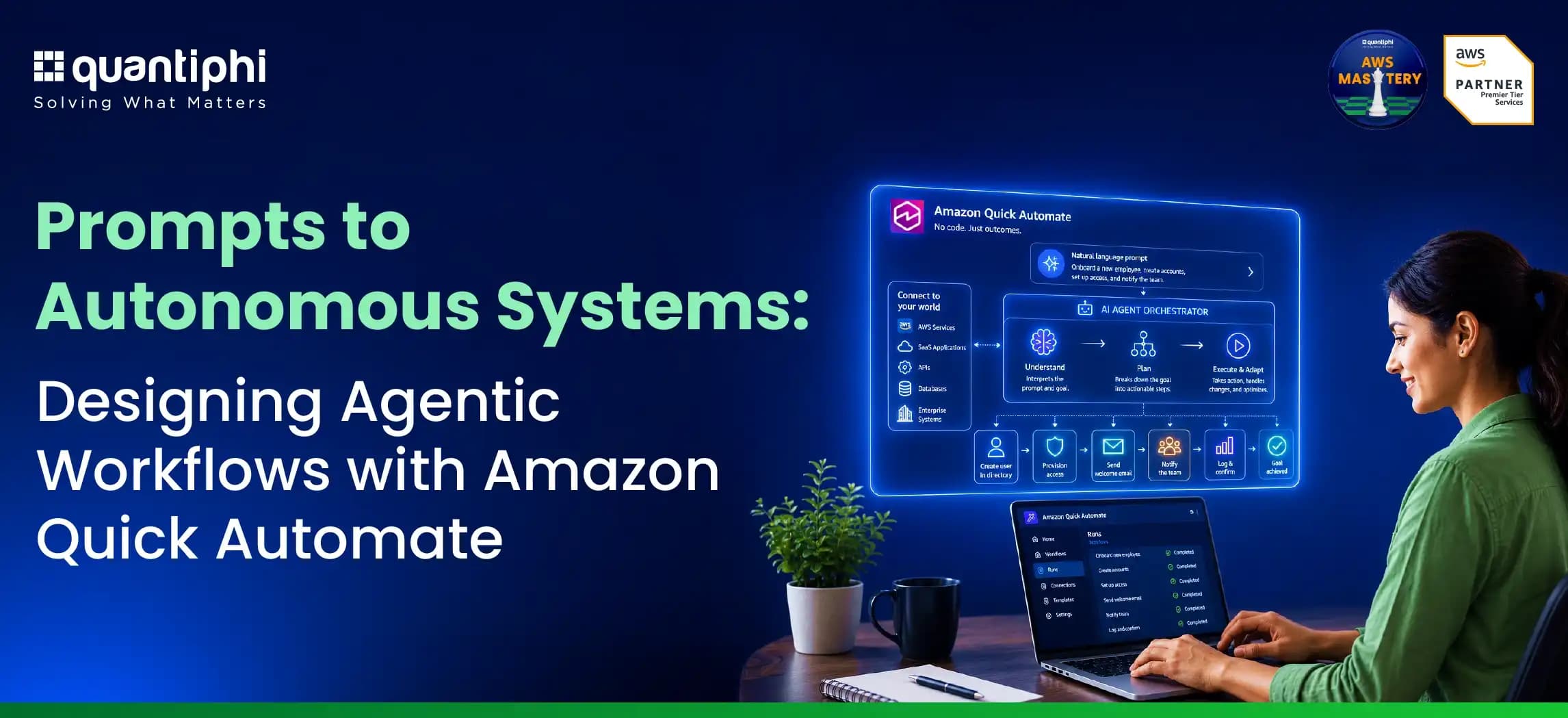
Prompts to Autonomous Systems: Designing Agentic Workflows with Amazon Quick Automate

Introduction
Enterprise workflows today are fragmented across systems, data silos, and manual processes, making it difficult to move from insight to action. Amazon Quick Suite addresses this challenge by bringing together agentic AI, data integration, and workflow orchestration into a unified workspace, enabling enterprises to design, automate, and scale intelligent workflows using natural language.
Amazon Quick Suite represents a comprehensive, generative AI-powered business intelligence and automation platform integrated natively within the broader AWS ecosystem. It is engineered to consolidate purpose-built AI agents, advanced data integration utilities, and backend orchestration capabilities into a singular, seamless digital workspace like Chat Agents, Spaces, Flows and Research. The suite provides an underlying “reasoning layer” that interfaces directly with relational databases, cloud storage services, corporate wikis, intranets, and third-party business applications. The platform operates through several integrated modules that function cohesively to drive enterprise intelligence and automated action across disparate departments.
What Is Amazon Quick Automate?
Amazon Quick Automate is a multi-agent automation service designed to orchestrate complex enterprise processes that span departments, business applications, APIs, user interfaces, and third-party systems.
It is AWS’ flagship orchestration engine engineered for complex, non-linear, multi-agent enterprise processes. It provides deep backend integration and autonomous decision-making capabilities, and is designed to handle mission-critical workflows that span multiple departments and operational systems.
By leveraging a team of specialized AI agents, it can coordinate tasks, make decisions, handle exceptions, and manage human approvals throughout a workflow. By reducing the complexity of building and maintaining these process automations, it enables organizations to streamline operations at scale. This makes it particularly valuable for document-centric processes such as Intelligent Document Processing, where multiple validation, approval, and business actions must be orchestrated end to end.
What Makes Agentic Workflows Different?
While traditional automation relies on predefined rules and fixed execution paths, agentic workflows introduce a more intelligent and adaptive approach to process automation. Instead of requiring every step and exception to be explicitly configured upfront, AI agents can leverage contextual information to make informed decisions and determine how best to progress a workflow toward its intended outcome.
Through multi-step planning, complex business objectives can be translated into a sequence of coordinated actions, workflows can be dynamically orchestrated to adapt as process conditions, inputs, or exceptions evolve. Importantly, this autonomy is balanced with human oversight, allowing agents to request approvals, seek clarification, or escalate decisions when business rules, confidence thresholds, or compliance requirements warrant human intervention. This combination of intelligent automation and governed decision making enables organizations to automate complex processes while maintaining the control and accountability required in enterprise environments.
QuickAutomate: AI Agentic Intelligent Document Processing Pipeline
Our primary objective is to ingest unstructured financial, legal, or administrative documents from an Amazon Simple Storage Service (S3) bucket, process those documents through advanced foundation models via AI Agents leveraging Bedrock to extract specific key information, and implement a deterministic Human-in-the-loop (HITL) validation protocol. Crucially, the system must recognize if certain vital key entities such as “Name” and “Address”—are missing, null, or identified with low confidence, and subsequently route the document for human validation before allowing the workflow to proceed.
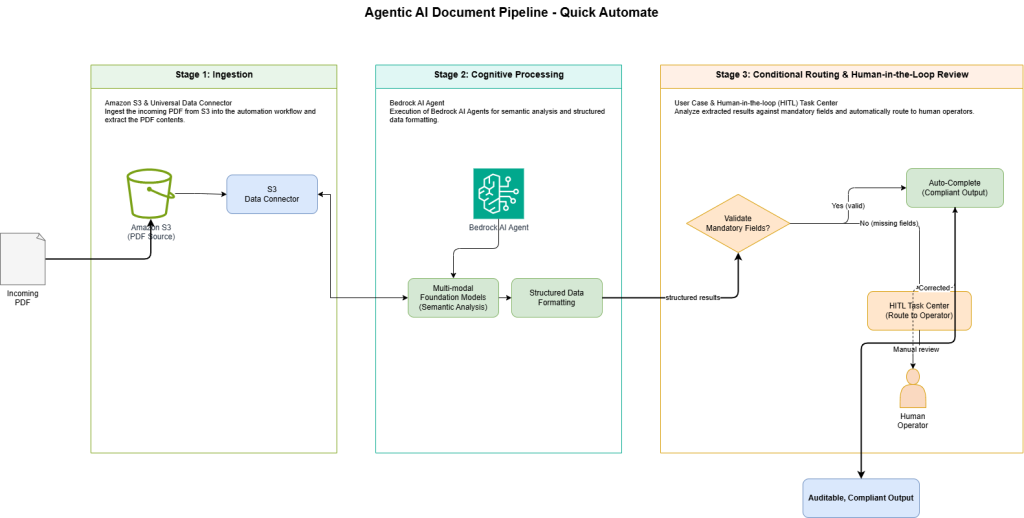
End-to-End Architecture Flow
Pipeline Component Overview
This architecture demonstrates how agentic AI can transform document-heavy workflows, reducing manual effort, improving accuracy, and ensuring compliance through intelligent routing and validation. The pipeline is structurally divided into three distinct operational stages, each leveraging specific AWS and Quick Suite features to ensure seamless execution and auditable compliance.
| Architecture Stage | AWS Service / Quick Suite Feature | Primary Functionality |
| Stage 1: Ingestion | Amazon S3 & Universal Data Connector | Ingest the incoming input PDF file from S3 into the Automation workflow and extract the contents of the PDF. |
| Stage 2: Cognitive Processing | Bedrock AI Agent | Execution of multi-modal foundation models for deep semantic analysis and structured data formatting. |
| Stage 3: Conditional Routing and Human in the Loop Review | User Case and Human-in-the-loop (HITL) Task Center | Analyze the extracted results based on mandatory fields and automatically route it to human operators. |
Synthesizing Workflows via the Automation Assistant
Amazon Quick Automate democratizes workflow creation through a sophisticated low-code/no-code User Interface (UI) featuring an embedded Automation Assistant.
The Automation Assistant acts as a highly capable Planning Agent. It allows business analysts, operations managers, and developers alike to construct complex, multi-agent pipelines entirely through natural language prompting. Building a workflow using the Automation Assistant in Quick Automate is a two-step guided intuitive process that bridges the gap between human intention and machine execution: High-Level Plan Generation and Low-Level Action Mapping.
Stage One: High-Level Plan Generation
To initiate the intelligent document processing pipeline, the human operator engages the Automation Assistant via the chat interface within the Quick Automate workspace. The structural integrity and functional accuracy of the resulting workflow are directly proportional to the specificity, clarity, and detail provided in the natural language prompt.
Execution Prompt Example for the Automation Assistant:
“””Construct a continuous document processing automation pipeline.
Step 1: Download unstructured PDF files as they are deposited into the Amazon S3 bucket and Key store them in a variable input_file and extract the textual data in the PDF pdf_text.
Step 2: Route the downloaded document to a custom AI agent powered by a detailed data extraction prompt with Pro Mode to handle complex reasoning ability. These 4 fields should be extracted from the given input PDF file in a JSON Format: org_name, org_address, invoice_number, total_amount. Store the extracted results in a variable called agent_output
Step 3: Using an IF condition logic to check if any of the mandatory fields (org_name, invoice_number, total_amount) are extracted as null or empty, create a new user case and perform the case by creating a user task for Human in the Loop (HITL) review to analyze the missing fields and submit the reviewed Tasks.“””
Upon receiving this comprehensive prompt, the Planning Agent utilizes its internal reasoning capabilities to analyze the semantic requirements. It automatically composes a high-level plan consisting of defined, logical process steps. The human operator is then prompted to review this proposed plan, ensuring that the sequential logic aligns precisely with the business requirements and regulatory constraints before authorizing the Assistant to proceed to the physical construction phase.
Stage Two: Low-Level Action Mapping
Once the high-level plan is validated by the user, the Automation Assistant transitions from conceptual planning to deterministic machine logic. It translates the approved steps into specific API calls, integrations, and logical operators, mapping the requirements directly to the available drag-and-drop tiles on the visual Workflow Canvas.
The Assistant automatically populates the Workflow Canvas with nodes corresponding to the S3 trigger, the Custom AI Agentic action, the JSON schema definition logic, the conditional branching (if/else operators), and the Create User Task node utilized for human intervention.
The Assistant also supports iterative editing; we can highlight specific nodes on the canvas and use natural language to request logic modifications, such as asking the Assistant to “Change the human routing destination in step 4 from ‘Compliance_Team’ to ‘Finance_Auditors'”.
This approach significantly reduces the gap between business intent and execution, allowing non-technical users to build production-grade workflows without writing code.
Deep Dive: Stage-by-Stage Pipeline Configuration
The following sections exhaustively dissect the specific configurations, theoretical mechanics, and enterprise implications of each node deployed by the Automation Assistant. This deep dive ensures the pipeline operates with the security, reliability, and precision required for production-grade enterprise deployments.
Stage 1: Unstructured Data Ingestion from Amazon S3
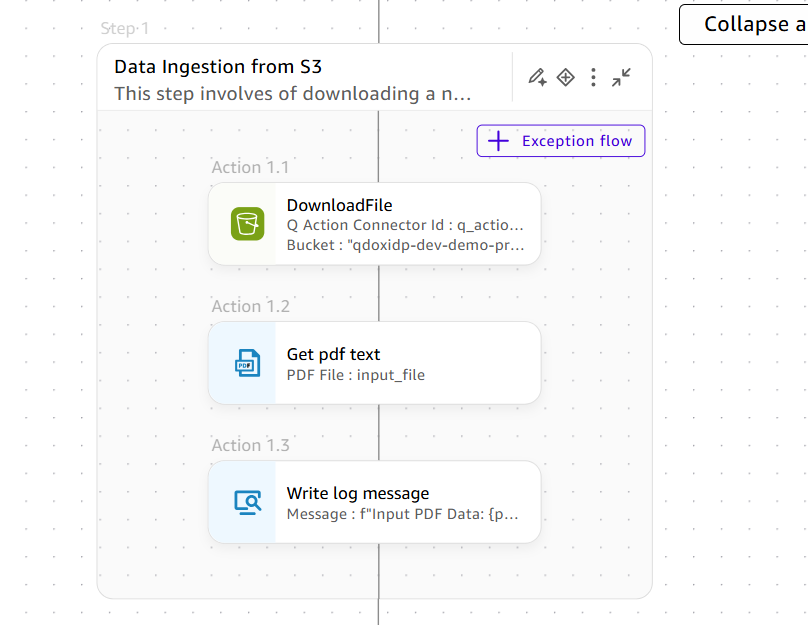
Download PDF File:
Amazon Quick Automate, part of the AWS Quick Suite, enables the creation of secure, generative AI-powered document processing pipelines through natural language prompting. The system ingests unstructured data from Amazon S3, using specialized AI agents for deep semantic analysis and data extraction into structured JSON formats. To maintain high precision and compliance, the platform incorporates a deterministic Human-in-the-loop (HITL) protocol that automatically routes missing or low-confidence data to a centralized Task Center for manual validation by expert reviewers before resuming the workflow.
On the Workflow Canvas, the visual node representing this step—often labeled as DownloadFile or S3Trigger—is parameterized with the target bucket name and the expected file key formats (such as .pdf, .txt, or .docx). The output generated by this node is dynamically mapped to a state variable, commonly designated as input_file or doc_text. This variable carries the raw, unstructured byte stream forward into the cognitive processing stage of the pipeline, ensuring that the heavy payload does not overwhelm the execution memory limits.
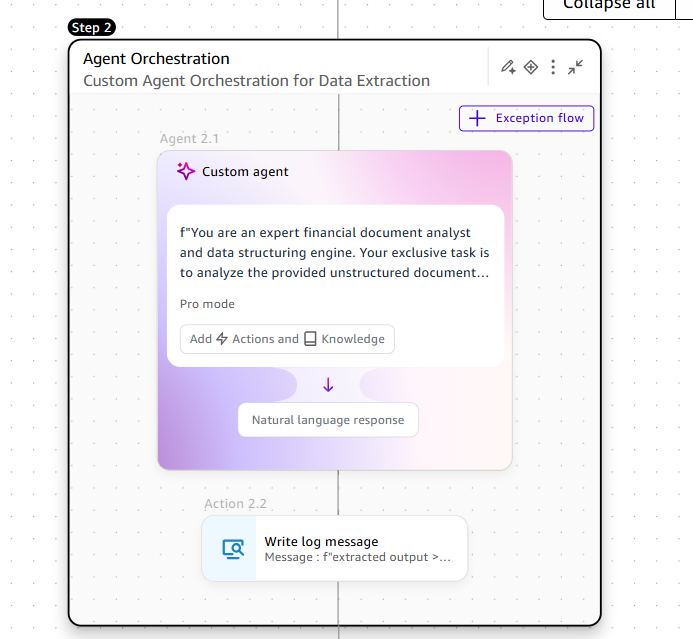
Stage 2: Custom Agent Orchestration For Data Extraction.
The action used to trigger a specialized AI assistant for processing tasks or making decisions is simply called the Custom Agent action. In the Quick Automate workflow builder, this action allows you to leverage specific AI models (often hosted via Amazon Bedrock) that have been configured with unique instructions, knowledge bases, or personas to handle complex steps in your automation.
We will be using this Custom Agent to extract the Key-Value Pair data from the input PDF file by using Mode as Pro which assigns high performing LLMs for complex reasoning tasks. The Agent Response can be saved in a variable called agent_output.
Engineering the Key-Value Pair (KVP) Extraction Schema
Amazon Quick Automate converts AI Agent output into structured JSON data for downstream systems using strict extraction schemas. Guided by natural language prompts, the platform establishes rigid Key-Value Pairs (KVPs) to ensure data integrity and minimize hallucinations.
| JSON Property Name (Key) | Data Type (Value) | Description / Agent Guidance Prompt | Required Flag |
| org_name | String | The full legal entity name of the vendor, customer, or individual billed in the document. | True |
| org_address | String | The complete physical mailing address associated with the primary entity. | False |
| invoice_number | String | The unique alphanumeric identifier explicitly assigned to the document or invoice. | True |
| total_amount | Number | The final summation of all financial charges, expressed strictly as a float or integer. | True |
Sample Prompt for KVP Extraction:
“You are an expert financial document analyst and data structuring engine. Your exclusive task is to analyze the provided unstructured document payload, which is represented by the variable {{input_text}}. You must extract the underlying semantic information and map it exclusively to the predefined JSON schema provided to you. You are required to extract the ‘Name’, ‘Address’, ‘Invoice_Number’, and ‘Total_Amount’. If a specific value cannot be confidently identified within the source text, you must return a strictly ‘null’ value for that specific key. Do not attempt to guess or hallucinate missing data. Do not provide any conversational preamble, pleasantries, or explanatory text; your output must be exclusively a valid, parseable JSON object.”
By utilizing strict type definitions (enforcing String, Number, or Array formats) and explicitly limiting object nesting to a maximum of 2 to 3 levels, the system optimizes the parsing performance of the foundation model.
Stage 3: Conditional Routing and Human in the Loop Review
HITL is essential because foundation models are probabilistic; documents may be obfuscated or missing data, posing risks in regulated industries. Quick Automate manages this via conditional routing nodes that check if mandatory fields like name or address are null. If fields are missing, the workflow triggers the Human-in-the-loop Task Center for manual validation before proceeding.
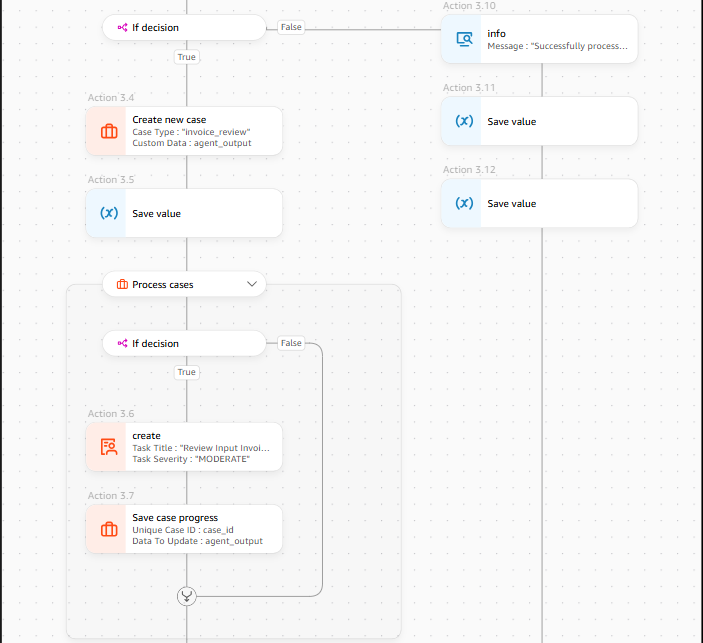
Add an IF/Else Condition block following your Custom Agent. You will configure the logical expression to check for missing data across your three mandatory variables.
- Condition Type: Match ANY of the following rules (OR logic).
- Rule 1: Variable org_name is empty/null.
- Rule 2: Variable invoice_number is empty/null.
- Rule 3: Variable total_amount is empty/null.
If all three fields are populated, the workflow proceeds down the “False” path (your happy path) to finalize the invoice. If any of those fields are missing, the workflow proceeds down the “True” path to our exception handling mechanism.
On the “True” path of your IF condition, add the action to Create Case. This centralizes the metadata about the failure so your operations team can track error rates and document types.
- Case Title: “Missing Invoice Data – [Insert Date/Document ID]”
- Case Description: “Custom Agent failed to extract one or more mandatory fields: Org Name, Invoice Number, or Total Amount.”
- Attachments: Attach the original input document to the case payload.
Following the creation, add the Process Case action to transition the case status to an active working state, signaling to the system that remediation has begun.
Add a Create User Task action to your workflow. This action pauses the automated execution for this specific instance and pushes a notification to a human operator’s queue.
- Task Assignment: Route this to your Accounts Payable or Operations queue.
- Task Interface: Configure the user form to display the original invoice document side-by-side with the fields the AI did manage to extract.
- Required Action: The human reviewer will read the document, manually type the missing org_name, invoice_number, or total_amount into the form, and click “Submit.”
Once the human reviewer submits the task, the missing variables are populated, the case is resolved, and the workflow can safely merge back into the main process to finalize the invoice.
When the Quick Automate pipeline routes a payload to the “Create user task” node, the interrupted task is immediately materialized within the Amazon Quick Suite Human-in-the-loop Task Center. The Task Center operates as a centralized, highly visible dashboard designed explicitly for operations teams, compliance officers, and human reviewers to manage processes that require nuanced judgment.
Task Center Mechanics and Resolution
The Task Center provides a centralized dashboard where compliance officers can resolve exceptions through a split-screen interface that pairs the original S3 document with automated extraction results. Reviewers manually input missing or low-confidence data, such as Names and Addresses, which then triggers a backend callback to resume the automated workflow with validated information. Alternatively, operators can archive invalid documents to prevent data pollution, ensuring that the pipeline maintains high semantic precision and auditable compliance across large-scale enterprise workflows.
Production Deployment Considerations for Enterprise Agentic Workflows
The seamless transition from prototype to production requires diligent architectural planning to support mission-critical enterprise workloads. For large-scale deployments, Amazon Quick Automate is engineered with robust mechanisms across three critical pillars: Scalability and Resilience, Data Security, and Auditable Governance.
- Scalability and Resilience
- Elastic Scaling and Concurrency: The underlying managed AWS infrastructure provides elastic scaling to dynamically absorb high-volume traffic spikes and maintain performance isolation. Requests are handled as stateless, distributed execution threads, enabling thousands of concurrent user interactions without performance degradation.
- Fault Tolerance and Automated Retries: To ensure systemic resilience, the platform incorporates built-in structural circuit breakers. These catch exceptions from connected external systems and return structured error payloads, preventing workflow crashes. Furthermore, an automated retry policy with exponential backoff is applied to transient network errors and temporary external API timeouts, ensuring continuous operation.
- Security and Compliance
- Zero Trust Identity Model: Operations adhere to a Zero Trust framework, requiring continuous authentication and authorization of every request. This is enforced through Role-Based Access Control (RBAC) with IAM roles and policies, short-lived OAuth 2.0 scopes, which ensure that AI agents operate on the principle of least privilege.
- Data Protection and Isolation: All data is secured via End-to-End Encryption, using TLS 1.3 for data in transit and enterprise-managed keys (like AWS KMS) for data at rest. Critically, multi-tenant environments are isolated with sandboxed execution threads and secure secrets vaults are used to inject sensitive API keys at runtime, preventing credentials from ever being exposed in conversational outputs.
- Auditability and Governance: The platform maintains centralized, immutable audit trails for every transaction, tool invocation, and user prompt. This end-to-end logging is essential for compliance teams to monitor autonomous AI behavior. Administrators can also apply enterprise governance controls such, as rate limits and data sanitization filters, to ensure responsible AI usage at scale.
Operationalizing Agentic Workflows at Enterprise Scale with Quantiphi
Quantiphi specializes in transforming pilot projects into mission-critical, enterprise-scale deployments of Amazon Quick Automate. Leveraging deep expertise across the AWS ecosystem, Quantiphi designs and implements end-to-end agentic workflows that are optimized for high throughput, governed by strict compliance frameworks. Our approach ensures seamless integration with existing data lakes (Amazon S3, Redshift) and identity management services (IAM, Cognito). This foundational integration enables clients to confidently scale their intelligent automation initiatives using AWS Quick Automate to build intelligent process flows.
Conclusion
Amazon Quick Automate, within the AWS Quick Suite, transforms the landscape of corporate data processing by integrating advanced generative AI with a sophisticated, low-code architectural framework. Through the use of natural language prompting, the platform empowers operational teams to architect intricate, multi-agent workflows while adhering to rigorous Zero-Trust security principles and data governance standards. A cornerstone of the system is its deterministic Human-in-the-loop (HITL) protocol based on a pre-defined logic, which effectively mitigates the probabilistic nature of foundation models by automatically routing null results to the Task Center for expert manual validation. This integration of autonomous cognitive processing and structured human intervention enables enterprises to execute mission-critical workflows at scale, achieving a higher standard of operational efficiency, semantic precision, and auditable compliance.
Ready to move from automation to truly agentic workflows?
Connect with Quantiphi to design, build, and scale AI systems that solve what matters.