Agentic AI in Action: Integrating Amazon Quick with MCP Servers on Bedrock AgentCore

Agentic AI systems are transforming from simple chat interfaces into proactive entities capable of autonomously planning, reasoning, and executing complex, multi-step tasks by interacting with external tools and diverse data sources.
In today’s enterprise landscape, critical business data and logic are distributed across numerous systems including CRMs, ERPs, and various APIs. The challenge for agentic AI lies in interfacing with these systems in a standardized, secure, and scalable manner, while avoiding the pitfalls of fragile, custom integrations for every new task.
This comprehensive guide demonstrates how to integrate enterprise applications with Amazon Quick using the Model Context Protocol (MCP), with MCP servers provisioned, secured, and managed by Amazon Bedrock AgentCore. We’ll cover two methods for exposing enterprise capabilities to AI agents: Amazon Bedrock AgentCore Gateway as a managed facade for existing services, and Amazon Bedrock AgentCore Runtime for deploying custom MCP servers with maximum extensibility.
WHAT IS AMAZON QUICK?
Amazon Quick (officially launched as Amazon Quick Suite) is a generative AI-powered enterprise workspace and digital productivity platform by Amazon Web Services (AWS). Operating as an “agentic AI teammate” for everyday business users, the platform allows non-technical employees to analyze data, build dashboards, and automate multi-step administrative tasks using natural language prompts without needing machine learning or coding expertise. It natively synthesizes four core modules—Quick Index for unified corporate data search, Quick Sight for AI-driven business intelligence, Quick Flows for routine automation, and Quick Research for generating deep, web-and-internal market reports.
Amazon Quick shifts AI from passive assistance to action-oriented execution across enterprise workflows.
AMAZON QUICK AS AN MCP CLIENT
A core architectural differentiator of Amazon Quick is its native integration with the open-source Model Context Protocol (MCP), functioning as a fully managed MCP client. This means Amazon Quick acts as the central interface that securely connects to, discovers, and orchestrates remote or custom-hosted MCP servers.
Through this protocol, Amazon Quick serves as a universal translator between the AI and fragmented corporate tech stacks. It allows organizations to plug into a vast ecosystem of apps (such as Atlassian, Asana, Box, PipeDrive etc) using standardized MCP servers. When an employee issues a prompt, the Amazon Quick MCP client dynamically discovers the data schemas, operational capabilities, and API endpoints exposed by those servers. It then safely routes tokens, maps streaming data via server-sent events (SSE), handles multi-legged OAuth authentication, and executes secure actions across external systems—all through a single conversational entry point.
This architecture is critical because it enables true agentic behavior, where AI doesn’t just respond, but acts across systems in real time.
AMAZON QUICK VS. AMAZON Q BUSINESS
Because AWS provides multiple generative AI tools, readers frequently confuse Amazon Quick with Amazon Q Business. While both solutions enhance productivity, Amazon Quick is designed for execution, while Amazon Q Business focuses on information retrieval and assistance. If you’re deciding which tool fits your use case, the table below breaks down the key differences:
| Feature/Scope | Amazon Quick (Quick Suite) | Amazon Q Business |
| Primary Identity | Unified, standalone agentic digital workspace app. | Conversational enterprise work assistant. |
| Core Value Drivers | Action-oriented task execution, live visual dashboarding, autonomous web navigation, and deep programmatic research. | Information discovery, document summarization, answering HR/Sales FAQs, and Q&A text drafting. |
| Data & BI Depth | Houses Quick Sight, an evolution of AWS BI that ingests, visuals, and charts structured databases alongside unstructured documents. | Primarily relies on pre-built connectors to surface existing information or tables from static sources. |
| Integration Model | Deeply relies on MCP client architecture for real-time tool orchestration and dynamic cross-app tool calling. | Relies on traditional enterprise data indexers and standard application plugins. |
WHY ENTERPRISES ADOPT AMAZON QUICK FOR ACTION-ORIENTED WORKFLOWS
Organizations are shifting away from passive chatbots that merely answer questions, choosing instead to deploy Amazon Quick to drive autonomous, action-oriented workflows across systems. Enterprises leverage the platform for three main operational benefits:
-
End-to-End Task Orchestration
Rather than requiring an employee to manually log into multiple software programs, Amazon Quick acts as an autonomous coordinator. For example, a project manager can instruct a single agent to look up lagging engineering tasks in Jira, evaluate the team’s capacity via a shared calendar, draft a status report, and distribute it through Slack.
-
Dynamic Tool Usage without Code
Through its MCP infrastructure, AI agents inside Amazon Quick do not just read text; they utilize corporate tools natively. An agent can generate live SQL queries, read or update live system logs, or interact directly with CRM databases to resolve customer tickets autonomously, lowering the mental barrier for non-developers.
-
Custom Agent-Driven Environments
Businesses can spin up dedicated collaborative “Spaces” equipped with personalized agents pre-programmed with specific brand guidelines, localized automation tools, and targeted document permissions. This allows teams to safely automate complex back-office calculations—such as real-time financial cost correlation or supply chain invoice reconciliation—while ensuring enterprise-grade data privacy and strict row-level AWS governance.
MODEL CONTEXT PROTOCOL(MCP)
The Model Context Protocol (MCP) is an open standard that defines how AI models interact with external tools and data sources — think of it like USB-C for enterprise software. Just as USB-C gave every device a single, universal connector regardless of brand, MCP gives every AI agent a single, standardized way to connect to any business system. It acts as a universal translator, enabling AI models to understand and command diverse enterprise systems.
For business leaders, MCP standardizes how AI agents perform actions, replacing fragile custom integrations with a resilient, scalable framework. For technical architects, MCP establishes a rigorous, standardized client-server architecture for AI-to-tool interactions, ensuring predictability, robust security, and scalability for complex agentic workflows in production.
MCP defines three fundamental primitives for AI-to-tool communication:
-
Tools
The verbs or actions an AI model can invoke (e.g., create_ticket for logging a support request, get_customer_details for fetching CRM data)
-
Resources
The nouns or data objects the server provides to the AI model’s context (e.g., files, database records, large text blocks like policy documents)
-
Prompts
Server-provided templates or instructions guiding the AI on how to structure requests for specific tools, ensuring consistency and effectiveness
HOW MCP DIFFERS FROM TRADITIONAL API INTEGRATIONS
| Operational Dimension | Traditional API Integrations | Model Context Protocol (MCP) |
| Integration Architecture | Fragmented & Custom: Every software vendor creates unique endpoints and data payloads, requiring custom code for every app. | Universal & Standardised: Introduces a single unified contract; any system wrapped in an MCP server talks to the AI natively. |
| Execution Model | Static & Hardcoded: Developers must pre-program exact workflow paths. Any schema changes break the link. | Dynamic Runtime Discovery: The server broadcasts tools and schemas on the fly; the AI reads this manifest to decide its next move. |
| Cognitive Autonomy | Linear Execution: Follows rigid, deterministic logic. Fails or throws an error when encountering unmapped edge cases. | Agentic Tool Calling: The AI evaluates tool outputs, corrects course autonomously, and links multi-step actions across systems. |
| Data Payload Depth | Raw Data Packets: Passes isolated strings (like JSON), requiring the receiving end to parse and map the data manually. | Context-Aware Streaming: Feeds live data directly into the LLM’s context window alongside prompts for immediate understanding. |
| Maintenance Overhead | High: IT teams must monitor, update, and patch dozens of distinct API connections whenever vendor software updates. | Low: A single connection to the protocol framework handles the heavy lifting, scaling easily to hundreds of tools. |
WHY MCP IS EMERGING AS THE STANDARD FOR ENTERPRISE AGENTIC AI
The open-source Model Context Protocol (MCP) is rapidly becoming the definitive architecture for corporate AI, serving as a universal connector much like USB-C did for hardware. Enterprises are adopting MCP to eliminate the heavy engineering costs of building custom API connectors for every application. By acting as a vendor-agnostic layer between frontier LLMs and fragmented data sources, MCP prevents vendor lock-in and allows companies to swap underlying models without breaking integrations. This standardization drives quantifiable efficiency gains, with early enterprise adopters reporting up to a 100% task success rate and a 30% reduction in compute token costs (per AWS reference implementations). Crucially, it secures the enterprise boundary by centralizing data governance, allowing IT administrators to enforce access controls, sanitize inputs, and audit AI actions directly at the server layer.
ENTERPRISE VALUE: SCALABILITY, GOVERNANCE, AND INTEROPERABILITY
Implementing the Model Context Protocol (MCP) yields immediate structural and financial advantages for modern enterprise IT infrastructure:
-
Universal Interoperability & Multi-Agent Compatibility:
MCP allows any AI agent or LLM client to securely connect to any backend data source. This prevents vendor lock-in, enabling organizations to deploy multi-agent systems from different providers that can all communicate with the same data repositories seamlessly.
-
Reusable AI Tools & Standardized Integrations:
Instead of building disposable, single-use connectors for specific projects, developers build an MCP server once. This creates a library of reusable, standardized tool sets that any department can safely plug into future AI initiatives.
-
Reduced Middleware Complexity:
By standardizing how AI interacts with databases and applications, MCP eliminates the need for expensive, custom middleware pipelines. This flattens the enterprise tech stack and reduces long-term software maintenance overhead.
-
Enterprise Governance & Security Control:
MCP centralizes data security by acting as an auditable gateway. IT administrators can enforce corporate compliance, restrict row-level data access, and log every autonomous tool execution directly at the server level.
SOLUTION OVERVIEW
The architecture employs a client-server model built on the foundation of MCP. Amazon Quick functions as the MCP client, requesting access to external tools and data sources. These capabilities are exposed through MCP servers that are securely deployed and managed within Amazon Bedrock AgentCore.
AgentCore provides two flexible mechanisms for hosting MCP servers. The AgentCore Gateway acts as a managed MCP server facade, wrapping existing non-MCP resources such as REST APIs and AWS Lambda functions as MCP-compatible tools. This approach proves ideal for rapid integration of existing services with minimal custom development, providing immediate access to established business logic.
The AgentCore Runtime offers a serverless compute environment for custom MCP server logic. Developers can build specialized tool implementations and manage complex agent interactions. This option provides maximum extensibility and control for novel, highly specialized capabilities, stateful interactions, or complex data access patterns requiring custom orchestration.
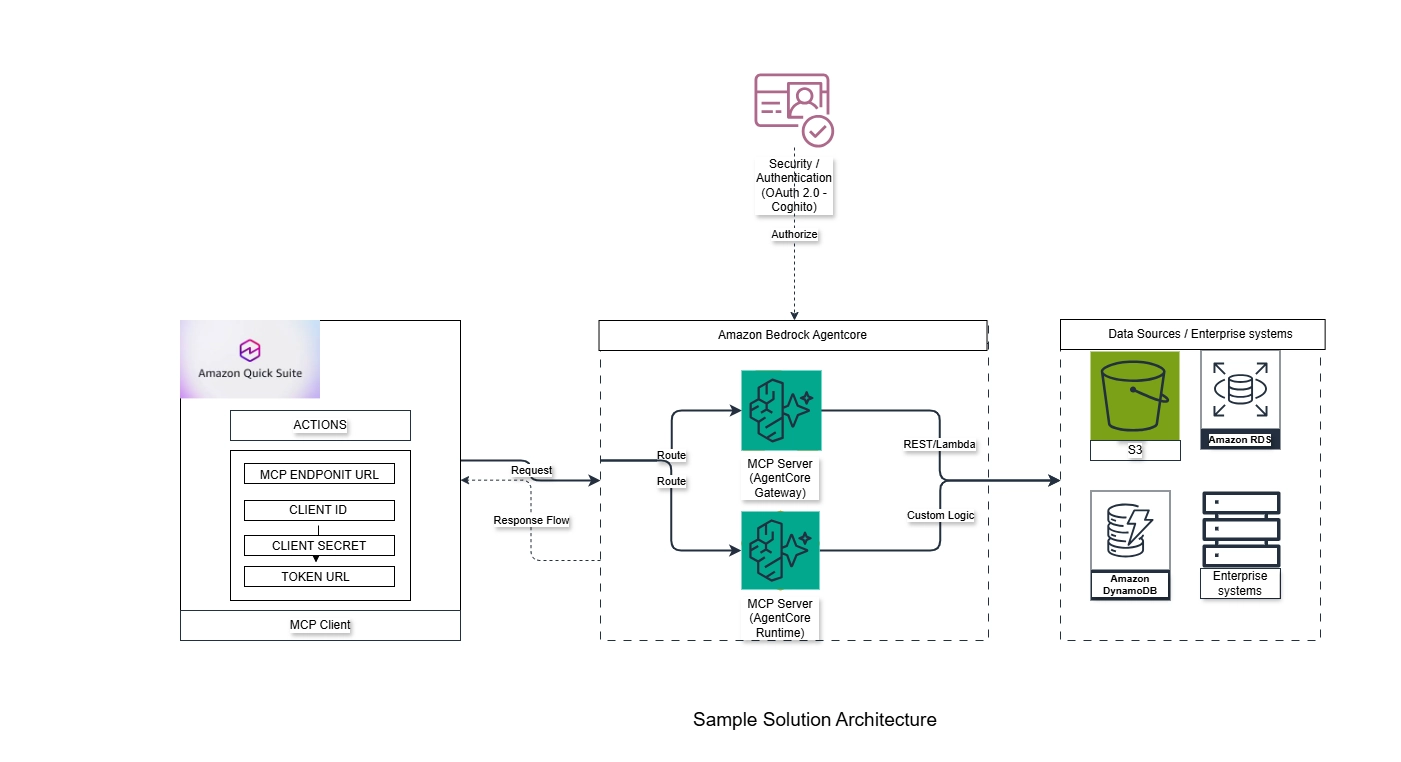
End-to-End Architecture Flow
When a user types a request into Amazon Quick, the system figures out which external tool can fulfill it, verifies the user has permission, sends the request securely to the right backend system, and returns a natural language response — all automatically. The steps below detail exactly how that happens under the hood.
-
Step 1: User Request in Amazon Quick
An employee types a natural language command into the Amazon Quick enterprise workspace interface (e.g., “Update the inventory status for SKU-884 and notify the logistics team via Slack”). The Amazon Quick client parses the request and initiates the orchestration sequence.
-
Step 2: MCP Tool Discovery
Amazon Quick references its cached tool manifest to find an action that matches the user’s intent. If the cache needs a refresh, Quick issues an outbound GET /mcp/v1/tools request to the connected Model Context Protocol endpoint to dynamically discover the exact parameter schemas required to execute the inventory update.
-
Step 3: OAuth Authentication & Token Validation
Before any data leaves the secure boundary, Amazon Quick invokes the configured OAuth 2.0 flow. For user-specific actions, it requests a short-lived token using Proof Key for Code Exchange (PKCE) alongside specific Resource Indicators (RFC 8707). The identity provider (e.g., Amazon Cognito) verifies the user’s authorization status, confirms their Role-Based Access Control (RBAC) privileges, and returns an encrypted access token.
-
Step 4: Request Routing via AgentCore Gateway or Runtime
Amazon Quick packages the validated token and the tool call parameters into an HTTPS request, routing it to the specified endpoint based on the deployment pattern:
-
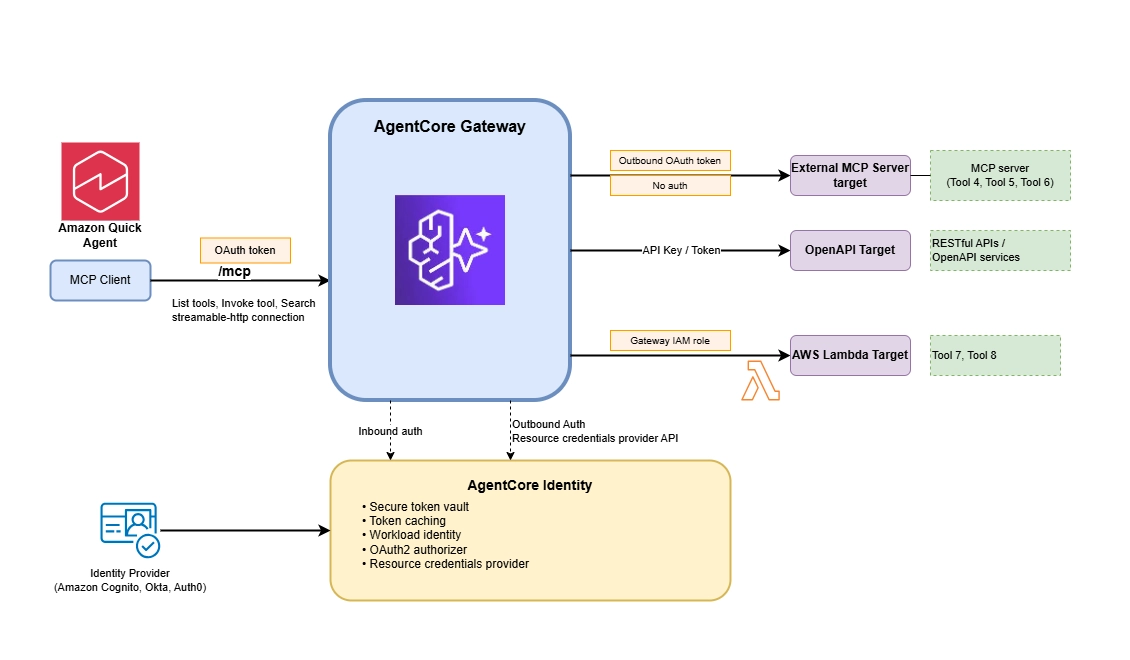
Via AgentCore Gateway: The Gateway acts as a managed routing facade. It intercepts the incoming MCP packet, translates the standard protocol request into the specific API format expected by the legacy infrastructure, and maps downstream credentials securely.
-
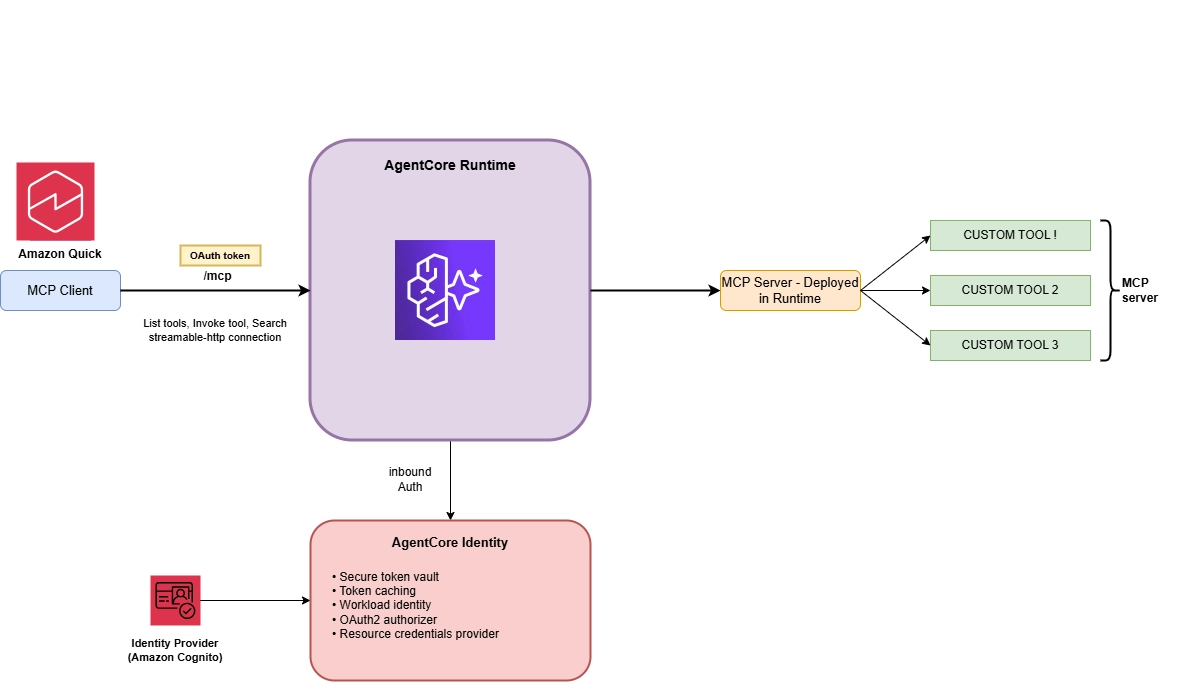
Via AgentCore Runtime: The request routes directly to a secure, serverless container instance. The runtime establishes an isolated Mcp-Session-Id header to spin up a sandboxed execution thread dedicated solely to that specific user interaction.
-
-
Step 5: Backend Tool Execution
The hosting infrastructure executes the targeted operation against the physical enterprise asset. The MCP server calls the downstream Enterprise Resource Planning (ERP) database to update the inventory logs for SKU-884 while simultaneously triggering a secondary webhook to pass the automated alert to the logistics channel on Slack.
-
Step 6: Structured Response Returned to Quick
Once the backend systems complete the operations, the MCP server captures the raw success codes and payload output. It packages this raw data into a standardized, structured JSON response format defined by the Model Context Protocol and streams it securely back over HTTPS to the waiting Amazon Quick client.
-
Step 7: Final AI Response Generation
The Amazon Quick agent ingests the structured backend response into the LLM’s active context window. The model processes the execution confirmation text, synthesizes it into natural language, and displays the final completed output to the employee (e.g., “I have successfully updated the inventory for SKU-884 to ‘In Transit’ and posted the confirmation alert directly to the #logistics Slack channel.”).
INTEGRATION APPROACHES
-
EXPOSING APIS AS TOOLS VIA AGENTCORE GATEWAY
The AgentCore Gateway is ideal for integrating existing services. It acts as a managed MCP server, translating existing service interfaces into the standardized MCP format without custom server code.
Key configurations for Gateway include:
-
Gateway Target:
Defines the specific API or function to be exposed (OpenAPI Specs, AWS Lambda Functions, Smithy Models)
-
Gateway Authorizer:
Secures the Gateway endpoint using OAuth 2.0 (e.g., Amazon Cognito) to ensure only authorized requests from Amazon Quick invoke tools
-
Credential Provider:
Manages credentials for downstream calls from the Gateway to target services (IAM roles for Lambda, secured storage for API Keys/OAuth for OpenAPI)
-
-
DEPLOYING CUSTOM MCP SERVERS IN BEDROCK AGENTCORE RUNTIME
The AgentCore Runtime is used for maximum customization, deploying custom MCP server containers for bespoke agent logic, specialized data access, or complex, stateful server-side management.
Technical configuration requirements:
-
Container Endpoint:
Custom MCP server containers must be accessible at 0.0.0.0:8000/mcp for AgentCore integration
-
Operating Modes:
- Stateless (stateless_http=True): Recommended for most servers; AgentCore manages session continuity via Mcp-Session-Id header
- Stateful (stateless_http=False): For advanced interactions requiring server-side state preservation
-
Deployment Process:
Package custom server code into a container image, upload to a secure repository (e.g., Amazon S3), and deploy using AgentCore CLI or console
-
Flexibility:
Developers can use preferred languages and frameworks; AgentCore manages infrastructure, scaling, and operational aspects
-
AGENTCORE GATEWAY VS AGENTCORE RUNTIME
| Feature / Dimension | AgentCore Gateway | AgentCore Runtime |
| Primary MCP Role | Central Aggregator / Federation Layer: Consolidates multiple downstream MCP servers, APIs, and Lambda functions into a single unified endpoint. | Direct Host Environment: Operates as a serverless container environment where custom-written MCP server code actually executes. |
| Integration Mechanics | “MCP-ifies” Existing Infrastructure: Wraps around legacy code, standard REST/GraphQL APIs, or AWS Lambda functions, dynamically translating them into the MCP standard without changing the original code. | Native Code Execution: Runs direct MCP server scripts (written via the Python or TypeScript MCP SDKs) that manage local file access, databases, or targeted tool scripts. |
| Tool Discovery Strategy | Semantic Search Mode: Features an intelligent, built-in search tool. Agents query what tool they need in plain text instead of filling up their prompt context with dozens of static schemas. | Static/Dynamic Manifest Delivery: Broadcasts a specific list of tools, prompts, and server-bound resources directly to the connected client or gateway. |
| Session & State Handling | Global Gateway Session Routing: Maps inbound client authentication requests and securely handles tokens across federated external environments. | Automated Isolated Sessions: Generates distinct Mcp-Session-Id headers under the hood, ensuring separate, isolated execution memory environments for each individual client. |
| Authentication Flow | Bilateral Complex Auth: Handles inbound agent client tokens (via Cognito or OAuth) and decrypts/stores outbound target secrets (using AgentCore Identity). | Direct Service Auth: Uses straightforward AWS IAM (SigV4 credentials) or specific machine-to-machine (M2M) OAuth configurations for incoming client requests. |
AMAZON QUICK’S MCP INTEGRATION
Amazon Quick acts as the sophisticated MCP client, discovering and invoking tools exposed by your MCP server. Integration focuses on streamlined configuration and security.
Key integration aspects:
-
Connection Setup:
Configured in the Amazon Quick console by providing the MCP server’s public endpoint URL and authentication credentials
-
Authentication:
Uses advanced OAuth 2.0 mechanisms: Proof Key for Code Exchange PKCE (S256 challenge) for user-based authentication, Resource Indicators (RFC 8707) for scope definition, and automated discovery (RFC 9728) and Dynamic Client Registration (DCR) for streamlined secure configuration
-
Capability Discovery:
Upon successful connection, Amazon Quick sends a GET /mcp/v1/tools request to discover and register exposed tools as “actions” for the agent
KEY CONSIDERATIONS AND LIMITATIONS
-
Connectivity:
Amazon Quick currently only supports remote HTTPS endpoints. MCP servers must be publicly accessible, though secured by OAuth 2.0 and AgentCore
-
Operation Timeout:
All MCP operations have a fixed 300-second (5-minute) timeout. Long-running tasks must complete and return a response within this window
-
Static Tool List:
The list of available tools is cached by Amazon Quick. Changes to exposed tools require deleting and recreating the integration definition
INTEGRATION CHECKLIST: BRINGING IT ALL TOGETHER
If you’re ready to implement, here’s the exact sequence to follow. Each step builds on the previous one, so work through them in order.
Step 1: Define Tools and Choose Deployment Pattern
Identify specific APIs, Lambda functions, or custom logic for AI agent access:
- Catalog existing services and APIs that provide business value for AI automation
- Determine which operations are most frequently requested by users
- Select AgentCore Gateway for existing REST APIs/Lambda functions/Smithy Models needing a managed facade
- Choose AgentCore Runtime for custom MCP servers with advanced logic or stateful interactions
Step 2: Implement Security and Capture Authentication IDs
Ensure comprehensive security implementation by setting up your identity provider (e.g., Amazon Cognito) before configuring the AgentCore deployment:
- Cognito Setup:
- Create a Cognito User Pool and Domain (generates /oauth2/token, /oauth2/authorize endpoints)
- Define a Resource Server and scope (e.g., hr-mcp/access)
- Create an App Client configured for Authorization Code Grant Flow with PKCE (for “User” authentication) or Client Credentials flow (for “Service” authentication)
- Capture IDs: Extract Cognito User Pool ID, Application Client ID, Client Secret (if applicable), Authorization Endpoint URL, and Token Endpoint URL. These are required in the subsequent deployment steps.
Step 3: Deploy and Configure the MCP Server and Capture Endpoints
Use the security IDs generated in Step 2 to configure the deployment:
For Gateway:
- Configure Gateway Target (OpenAPI/Lambda specifications)
- Secure with OAuth Authorizer (using IDs from Step 2)
- Set up Credential Provider for downstream authentication
- Capture the generated Endpoint URL(Gateway URL)
For Runtime:
- Build and containerize your custom MCP server (listening at 0.0.0.0:8000/mcp)
- Deploy to AgentCore Runtime with inbound authorization using the cognito client created in step 2.
- Configure operating mode (stateless recommended)
- Capture the Runtime URL
Step 4: Register the Integration in Amazon Quick
Configure the MCP integration in the Amazon Quick console:
- Navigate to “Connectors” and select “Model Context Protocol (MCP)”
- Enter the secure HTTPS MCP Server Endpoint URL from Step 3
- Configure Authentication:
- User (PKCE) Flow: Recommended for strong role-based access control(RBAC). Requires Client ID, Authorization Endpoint URL, Token Endpoint URL, User Pool ID (from Step 2)
- Service Flow: For non-user-specific actions. Requires Client ID, Client Secret, Token Endpoint URL (from Step 2)
- After saving, Amazon Quick performs MCP Discovery (GET /mcp/v1/tools)
- Enable specific “actions” in the Quick console that the agent is authorized to invoke
Step 5: Test and Operate
Implement comprehensive testing and operational procedures:
- Test: Rigorously test tool invocations via Amazon Quick, verifying functionality, security, and performance
- Monitor: Implement comprehensive server-side logging for all tool calls (context, latency, status, errors). For debugging purposes refer debug agentcore gateway and Troubleshoot AgentCore Runtime
- Govern: Enforce per-tenant and per-user rate limits on the MCP server to protect downstream systems, returning throttling errors (e.g., HTTP 429)
- Version: Treat tool schemas as formal contracts. Plan, communicate, and version changes carefully. Non-backward-compatible changes require recreating the integration definition in Amazon Quick
SECURITY, GOVERNANCE, AND COMPLIANCE
Enterprise security is maintained across three critical layers: Identity & Access, Data Protection, and Auditability & Governance
Identity & Access
-
Role-Based Access Control (RBAC):
Amazon Quick maps user identities directly to underlying enterprise access permissions. IT administrators define distinct execution roles, dictating which specific organizational groups can discover or invoke registered MCP tools. This prevents unauthorized users from executing sensitive agent actions—such as modifying financial records or provisioning infrastructure—even if the tool is globally registered in the workspace console.
-
Granular OAuth Scopes:
To limit the blast radius of automated tools, authentication leverages granular, short-lived OAuth 2.0 scopes. By pairing with Resource Indicators (RFC 8707), Amazon Quick requests targeted, narrow scopes specific to the exact external endpoint or resource it needs to interact with. This enforces the principle of least privilege, ensuring that an AI agent reading data from a CRM cannot inadvertently write or delete records elsewhere in the system.
-
Zero Trust Architecture:
The integration operates on an absolute Zero Trust model, assuming every network path and system boundary is hostile. Amazon Quick continuously authenticates and authorizes every single request at the boundary layer. The system verifies user identity, contextual permissions, device posture, and cryptographic keys before granting an AI agent temporary, one-time execution rights to an external MCP server.
Data Protection
-
Multi-Tenant Isolation:
Multi-tenant enterprise environments are isolated at the architectural level. Every user session generates distinct, sandboxed execution threads under unique tracking headers. Data payloads, token routing paths, and cached runtime schemas remain completely siloed within their respective organizational tenants, strictly guaranteeing that tenant data never bleeds across compliance boundaries or enters shared AI training models.
-
Centralized Secrets Management:
Sensitive API keys, client secrets, and database credentials are never hardcoded or exposed within the runtime environment. Amazon Quick stores and injects authentication tokens at runtime using secure, managed secrets vaults. This setup protects credentials from being leaked during conversational AI outputs or exposed in the event of an external server compromise.
-
End-to-End Encryption:
All data moving through the system is cryptographically protected using advanced encryption mechanisms. Payloads are secured in transit across public networks using TLS 1.3 (HTTPS), while internal data structures, cached schemas, and workspace assets are encrypted at rest using enterprise-managed keys (such as AWS KMS) to defend against unauthorized intercept or extraction.
Auditability & Governance
-
Audit Logging & Compliance:
Every transaction, discovery request, and tool invocation passing through Amazon Quick is written to centralized, immutable audit trails. These logs track the exact identity of the initiating user, the natural language prompt, the generated code parameters, and the server responses. This provides compliance teams with an end-to-end audit chain to monitor automated AI behaviors and verify regulatory alignment.
-
Enterprise Governance Controls:
Administrators can set global compliance rules and operational boundaries for AI agent behavior. These boundaries include setting rate limits to prevent resource exhaustion, configuring data sanitization filters to scrub personally identifiable information (PII) before it reaches external endpoints, and implementing mandatory human-in-the-loop approvals for high-risk write or delete actions.
ENTERPRISE INTEGRATION USE CASES
This architecture enables Amazon Quick to function as an action-oriented agent, translating user requests into calls to MCP tools that interact with backend enterprise systems.
Common agentic workflows include:
-
CRM Integration:
Summarize open opportunities for Acme Corp in negotiation” (Agent invokes tool to retrieve and summarize CRM data)
-
IT Service Management:
“Log a priority 3 ticket for slow laptop performance” (Agent gathers details and invokes tool to create a support ticket)
-
ERP/Inventory Management:
“What’s the stock level of SKU #12345 and next shipment date?” (Agent calls tool to query ERP for inventory and shipment data)
-
HR Systems:
“How many vacation days remain, and what’s the carry-over policy?” (Agent invokes tool to look up leave balance and policy)
-
Custom Business Applications:
“Calculate the risk score for the new APAC account acquisition” (Agent invokes bespoke tool on AgentCore Runtime for proprietary logic)
SCALABILITY AND PERFORMANCE
To guarantee production-grade reliability during autonomous workflows, Amazon Quick and the underlying AgentCore infrastructure are engineered to balance execution speed with systemic resilience. The architecture manages high-volume enterprise throughput through the following mechanisms:
-
Latency Optimization:
Because agentic workflows require sequential reasoning loops, the integration reduces round-trip times by transmitting lightweight, pre-processed payloads. The system avoids deep middleware nesting and structures data to stream efficiently, ensuring that raw database dumps do not bloat the LLM’s context window or degrade processing speeds.
-
Elastic Infrastructure Scaling:
The architecture scales dynamically to absorb traffic spikes without performance loss. When routing requests through AgentCore Gateway, the managed AWS infrastructure automatically scales API handling layers, while AgentCore Runtime provisions and tears down serverless container instances on demand based on real-time inbound request volume.
-
Concurrent Session Management:
Amazon Quick maintains strict performance isolation by passing unique, isolated session headers for every simultaneous user interaction. The underlying MCP servers process these requests as stateless, distributed execution threads, allowing thousands of concurrent enterprise users to trigger workflows without causing database thread-locking.
-
Fault Tolerance:
The platform features built-in structural circuit breakers to handle downstream system failures. If a connected enterprise tool or legacy database throws an error, the MCP server catches the exception and returns a structured error payload, allowing the upstream Amazon Quick agent to safely handle the failure rather than crashing the workspace session.
-
Asynchronous Workflow Handling:
For long-running operations that exceed standard network timeouts, the platform shifts from synchronous blocking to asynchronous execution. The MCP server instantly acknowledges the request, generates a tracking ID, offloads the task to a managed queue, and allows the Amazon Quick agent to periodically check for the final execution status.
-
Automated Retry Policy:
To handle transient network jitter or temporary external API timeouts, the architecture applies automated retry loops with exponential backoff and randomized jitter. This ensures that brief connectivity drops do not cause an entire multi-step business workflow to fail.
-
Multi-Layer Caching:
To minimize redundant database operations, Amazon Quick caches the structural tool schema list locally after the initial discovery handshake. On the backend, data caching layers store frequently requested, slow-moving corporate data to eliminate repetitive, resource-heavy backend queries.
Driving Enterprise-Scale Agentic AI with Quantiphi
At Quantiphi, we bridge the gap between cutting-edge generative AI research and pragmatic enterprise applications. By integrating Amazon Quick, the Model Context Protocol (MCP), and Amazon Bedrock AgentCore, we deliver secure, scalable, and high-impact agentic workflows. Leveraging our deep AI/ML engineering expertise, we ensure AI agents are not just intelligent, but seamlessly embedded into your critical business processes. We partner with enterprises to build and govern robust AI architectures—turning complex data into autonomous, actionable outcomes.
CONCLUSION
By following the five-step integration checklist and understanding the key architectural components, organizations can build robust AI integrations that deliver tangible business value. The flexibility to choose between AgentCore Gateway for rapid existing service integration and AgentCore Runtime for custom solutions ensures this architecture meets diverse enterprise requirements while maintaining consistent operational standards
The shift to MCP-based agentic systems isn’t just a technical upgrade — it’s a fundamental change in how enterprises think about AI’s role in workflows. Instead of AI that merely answers questions, you get AI that autonomously completes tasks and coordinates across systems. MCP’s vendor-agnostic design also ensures your investment is future-proof: as models evolve and business systems change, your integrations remain stable and your governance controls stay intact. For enterprises serious about scaling AI beyond pilots, this architecture represents the clearest path from experimentation to production-grade impact.
Ready to move from AI experimentation to enterprise-scale agentic systems?
Connect with Quantiphi to design, build, and scale AI solutions that solve what matters.